Memory, agents, assets — one graph.
Kumiho is the memory-and-provenance substrate for the agentic era: a versioned, typed graph with formal belief revision and provenance on every fact. AI Memory and Revka run on it today — and the same engine version-controls creative assets in production pipelines.
curl -fsSL https://kumiho.io/install | shFree · single-user · runs entirely on your machine
$ kumiho get kref://CognitiveMemory/preferences/ui-theme.preference

r1  dark mode
r2  Dracula theme
r3  SUPERSEDES r2 → Solarized
AI Memory
A cognitive memory core, not an embedding cache.
Every capture becomes a typed, versioned node in a provenance graph. When the world changes, memory is revised — formally — instead of accumulating contradictions.
- Belief revision, proven
- AGM-compliant revise/contract/expand — 49/49 compliance scenarios pass against the shipped engine, and the report is public.
- Write-time ontology
- Facts, decisions, entities, and relations are extracted when memory is written, not guessed at recall time.
- Two reflexes, any agent
- engage before responding, reflect after — one MCP server plugs into Claude Code, Codex, or your own stack.
- Dream State
- Async consolidation reviews, links, and prunes memory in the background — with circuit breakers, never silent destruction.
- kref:// addressing
- Every memory revision has a stable URI. Cite it, diff it, trace it, roll it back.
- Hybrid retrieval
- Full-text, graph traversal, and vector similarity fuse into one ranked recall. Similarity is a mode, not the model.
without memory
Session 1  "I prefer dark mode"
Session 2  asks again
Session 5  recalls the wrong preference
with kumiho
kref://CognitiveMemory/preferences/ui-theme.preference
r1  dark mode
r2  Dracula theme
r3  SUPERSEDES r2 → Solarized
LoCoMo-Plus 93.3% · AGM compliance 49/49 — every number links to a public artifact you can re-run.
Benchmark harness + resultspip install kumiho-memoryRevka
Memory-native AI agent runtime.
Agent workflows with a tamper-evident Merkle audit trail — small enough for one operator, structured enough for a security review. Every run is remembered in the same graph, so your agents inherit everything Kumiho knows.
Drives the CLIs you already use
- Claude Code
- Codex
- Antigravity
- Cursor
- OpenCode
How it works
Your files and conversations stay where they are. Kumiho keeps the structure: what was learned, decided, and changed — and what depends on what.
Your storage
local / NAS / S3 / agent disk
Files and conversation artifacts never move.
Clients
MCP / plugins / SDK / REST
Register revisions and memory events.
Kumiho graph
Neo4j + Redis
Typed nodes, provenance edges, working memory.
Query & act
recall / audit / events
Browse, trace, automate, remember.
Under the hood: Multi-tenant isolation · Data residency · Real-time events · Dream State circuit breakers · Immutable audit trail · Patent-pending architecture
The foundation: version control for creative work.
Kumiho didn’t start as an AI-memory demo. The engine underneath was built for creative pipelines, where losing history costs real money — immutable revisions, typed dependencies, and lineage for every render, model, and file. Agent memory inherits that rigor.
A real workflow
- Generate 200 AI variations with prompt, model, and seed captured.
- Compare and filter by metadata and lineage.
- Pick and publish immutable revisions.
- Trace provenance at any time.
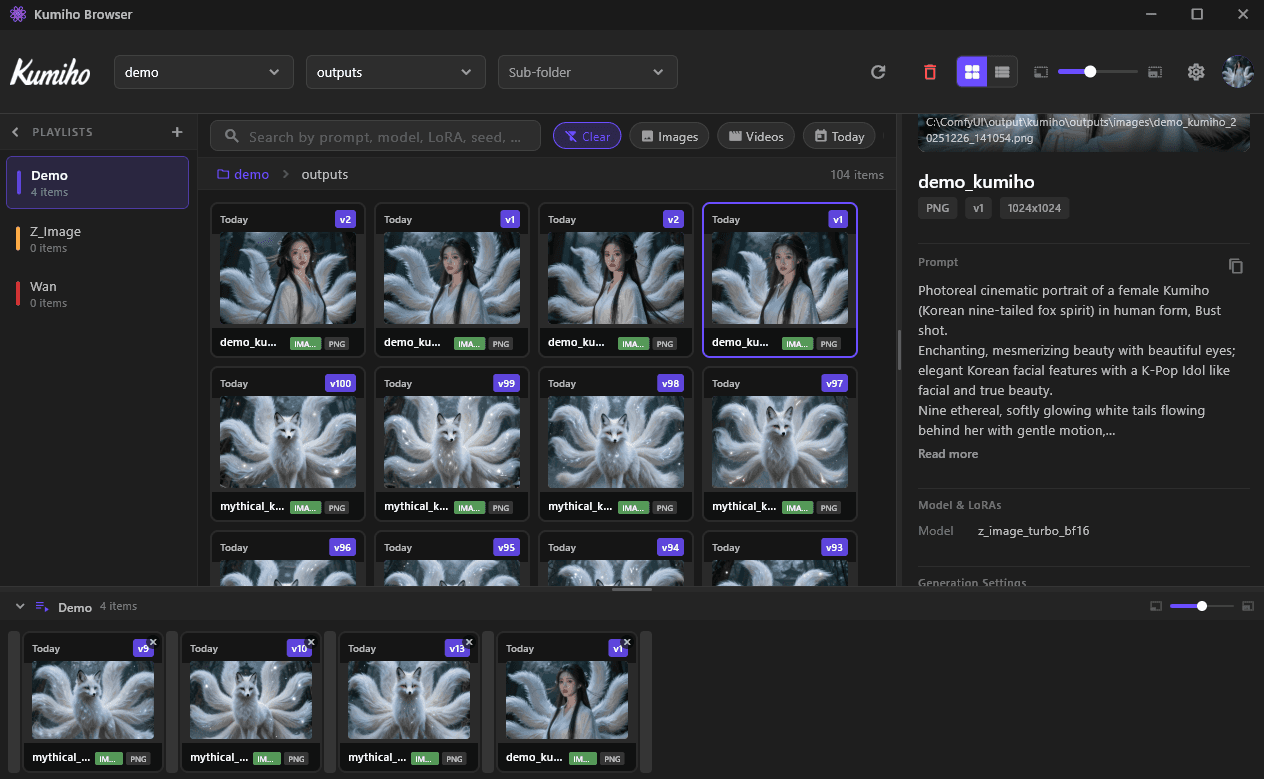
From filename chaos to addressable history
Before  project_final/hero_v3_approved_v2.png
After   kref://project/characters/hero.image
        5 revisions · lineage · metadata · publish state
See it in 60 seconds
Register → Revise → Relate → Retrieve
Ways to start
Pick the entry point that matches how you work. Each one registers into the same graph.
- connect
MCP
Give MCP-compatible agents persistent memory with a single integration path.
- build
Python SDK
Embed revision history and memory primitives into your own product.
- integrate
REST API
Direct HTTP access to items, revisions, edges, and search pipelines.
- create
ComfyUI
Version every generation — prompt, model, seed, and lineage captured.
- automate
n8n
Trigger downstream work when assets or memory states change.
Common questions
Do I have to migrate storage?
No. Files and conversation artifacts stay where they are. Kumiho stores structure — revisions, relationships, provenance — and pointers.
How is this different from a vector database?
Kumiho stores versioned, typed nodes with provenance and dependency edges, and revises beliefs formally when facts change. Vector similarity is one retrieval mode, not the memory model.
Does conversation data leave my machine?
Not with Community Edition — the server binds to loopback only and stores everything in your local Neo4j. Full conversations can stay local as artifacts.
Can I switch LLM providers?
Yes. Memory lives in the graph, not the model — history, provenance, and recall carry across provider and model changes.
Is Kumiho open source?
The SDKs and the benchmark harness are public on GitHub, including the AGM compliance suite you can run yourself. The Community Edition server is a free binary under an EULA.
What does the free tier include?
Managed cloud plans include the core graph workspace with AI Cognitive Memory. Community Edition is the free, self-hosted option with no data caps.
Start with one folder or one MCP connection.
Community Edition is free and runs entirely on your machine. Cloud when — and if — you want it.
curl -fsSL https://kumiho.io/install | shFree · single-user · runs entirely on your machine