Desktop application · free download
AI results shouldn't just be PNGs
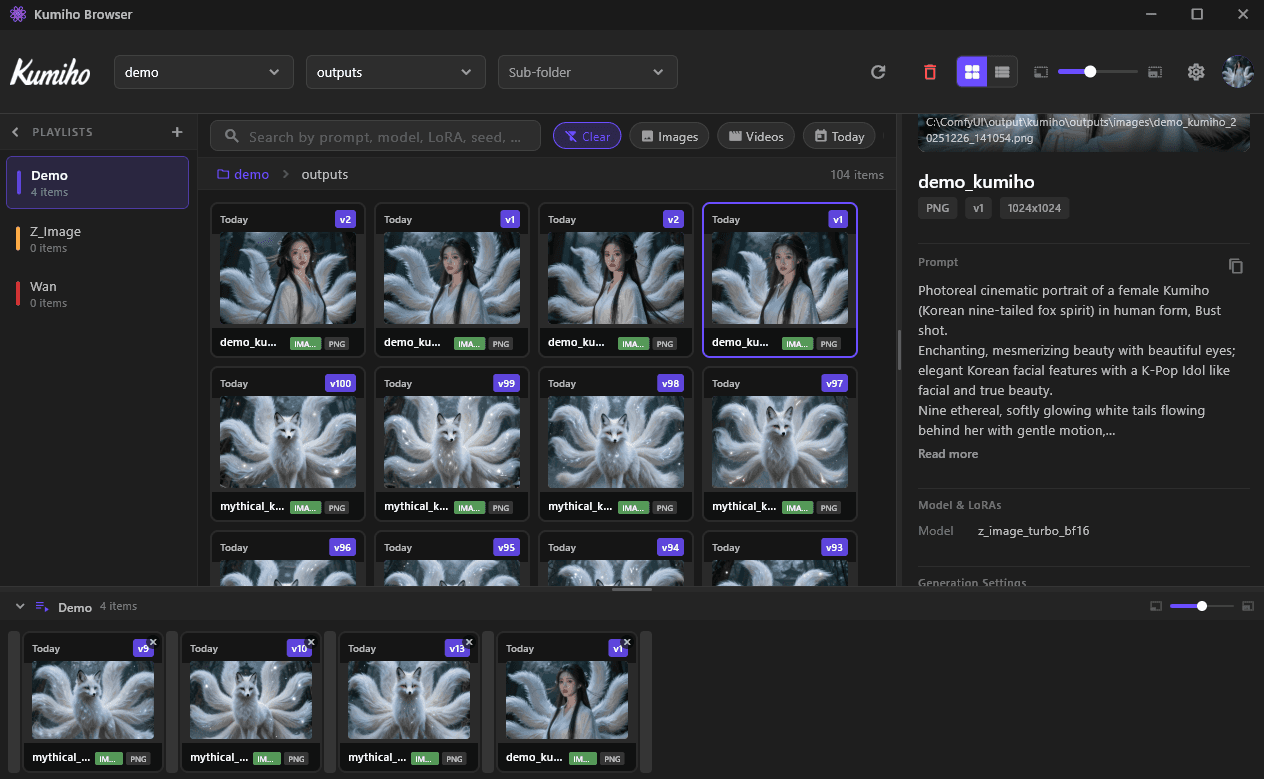
Turn your output folder into a searchable library. Kumiho tracks prompts, models, and versions automatically — without changing your workflow.
No uploads. Uses your existing folders.
Install from the command line
Prefer a one-liner? Pipe the installer straight from GitHub — it grabs the latest release for your OS.
Windows · PowerShell
irm https://raw.githubusercontent.com/KumihoIO/kumiho-apps/main/install/asset-browser.ps1 | iexmacOS · Linux
curl -fsSL https://raw.githubusercontent.com/KumihoIO/kumiho-apps/main/install/asset-browser.sh | shFrom folder chaos to searchable library
Three clicks. That's it.
Point to your folder
Select your ComfyUI output folder. Assets appear instantly — no import, no copy.
/ComfyUI/outputs/
See every version
Click any asset to see its revision timeline, prompts, models, and seeds.
v1 draft → v2 upscale → v3 final
Search by anything
Find assets by prompt fragment, model name, date, or seed. No more scrolling.
“cyberpunk city, v1.5”
Built for how you actually work
No heavy apps. No workflow changes. Just organization.
- Instant Preview
- Preview PNG, JPG, EXR, and more without opening Photoshop or your DCC tool.
- Deep Search
- Search by prompt keywords, model names, seeds, tags, or generation date.
- Graph View
- See the full lineage — from initial sketch to final render. Know what led to what.
- One-Click Restore
- Made a mistake? Restore any previous version instantly. Never lose good work.
Common Questions
"Does it move my files?"
No. Your files stay exactly where they are. Kumiho only reads metadata and creates an index — it never moves, copies, or modifies your originals.
"Does it upload to the cloud?"
No. Kumiho Browser is 100% local-first. Nothing leaves your machine unless you explicitly choose to sync with Kumiho Cloud (optional).
"Can I share my work?"
Yes. Share images and videos directly to social media (X and more coming). Metadata like prompts and model info can be included or stripped — you control what's shared.
Privacy first
Your pixels.
Your machine.
Kumiho Browser is local-first by design. We index metadata and build the asset graph — but your actual files never leave your drive.
- Zero cloud storage costs
- Instant access — no download wait
- Works fully offline
- Optional cloud sync (you decide)
Stop losing track of your best work
Download Kumiho Browser and turn your output folder into a searchable, version-tracked asset library.