
Give Your AI Agent Memory That Actually Works
Your AI assistant forgets everything the moment the conversation ends. Every session starts from zero. You repeat yourself. It asks the same questions. Context disappears.
We built a fix.
Introducing @kumiho/openclaw-kumiho
The Kumiho plugin for OpenClaw gives your agent persistent, graph-native memory that survives sessions, model swaps, and channel switches — with a privacy-first architecture where raw conversations never leave your machine.
Install it in two commands:
# 1. Install the OpenClaw plugin
openclaw plugins install @kumiho/openclaw-kumiho

# 2. Set up the Python backend + authenticate
npx --package=@kumiho/openclaw-kumiho kumiho-setup
That's it. Your agent now remembers.
How It Works
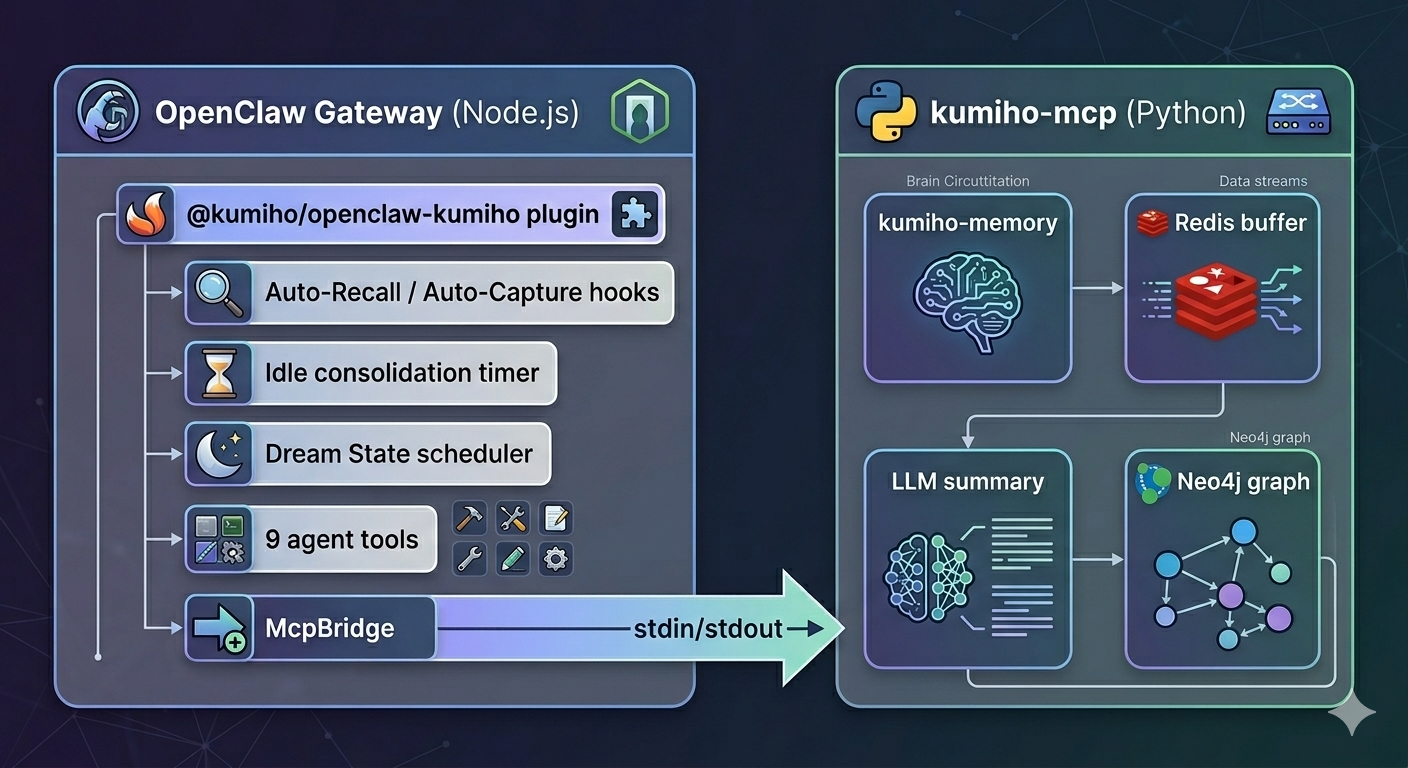
Every conversation flows through two automatic hooks:
Auto-Recall — Before your agent responds, Kumiho searches its memory graph for anything relevant to what you just said. Facts, preferences, past decisions — all injected into context silently.
Auto-Capture — After the agent responds, Kumiho extracts what matters (facts, decisions, action items) and stores structured summaries in a Neo4j graph database. Not raw chat logs — distilled knowledge.
The result: your agent builds a growing understanding of you over time, across every conversation.
Zero-Latency Recall
Memory lookup doesn't slow your agent down. After the first turn, recall adds 0ms to response time.
Here's the trick: while you're reading the agent's response, Kumiho prefetches memories for the next likely topic in the background. When you send your next message, the context is already waiting. No round-trip. No delay.
- Turn 1 (cold start): Recall runs in parallel. Up to 1.5s timeout — the agent starts regardless.
- Background prefetch: While you read the response, memories for the next turn are fetched.
- Turn 2+: Context is already waiting. Zero milliseconds added.
Privacy-First by Design
YOUR DEVICE                         KUMIHO CLOUD
========================            ========================
Raw conversations        ----X----> Never uploaded
Voice recordings         ----X----> Never uploaded
Images / screenshots     ----X----> Never uploaded

Structured summaries     ----------> Stored in graph DB
Extracted facts          ----------> Stored in graph DB
Raw data stays on your machine. Only structured, PII-redacted summaries reach the graph database. Emails, phone numbers, and SSNs are automatically scrubbed before anything leaves your device.
Cross-Channel Continuity
Start a conversation on Telegram in the morning. Continue on Slack at lunch. Switch to WhatsApp on your phone. Kumiho tracks memory by user, not by channel — your agent's understanding follows you everywhere.
Session IDs are user-centric:
alice-personal:user-7f3a9b:20260203:001
Same user, any channel, continuous memory.
Two-Track Consolidation
Short-term memories live in a Redis working buffer. They get consolidated into the long-term Neo4j graph via two tracks:
| Track | Trigger | Default |
|---|---|---|
| Threshold | messageCount >= consolidationThreshold | 20 messages (10 turns) |
| Idle | No activity for idleConsolidationTimeout seconds | 300s (5 min) |
Short conversations don't get lost. Long conversations don't overflow. Both tracks reset the counter and start a fresh session.
Dream State: Memory Maintenance While You Sleep
Kumiho includes a built-in Dream State scheduler. Every night, it reviews its own memories — deprecating stale facts, discovering connections between memories, and keeping the graph clean. Like a brain consolidating during sleep.
In 0.2.2, Dream State runs natively inside the plugin using OpenClaw's LLM routing. No external API keys needed.
Configure it in your plugin config or ~/.kumiho/preferences.json:
{
  "dreamState": {
    "schedule": "0 3 * * *",
    "model": {
      "provider": "anthropic",
      "model": "claude-haiku-4-5-20251001"
    }
  }
}
Or test it manually:
openclaw kumiho dream
9 Agent Tools
Beyond automatic recall and capture, your agent gets explicit memory operations:
| Tool | What it does |
|---|---|
memory_search | Query memories by natural language |
memory_store | Explicitly save a fact or decision |
memory_get | Retrieve a specific memory by kref |
memory_list | List recent memories |
memory_forget | Delete or deprecate a memory |
memory_consolidate | Force session consolidation |
memory_dream | Trigger Dream State maintenance |
creative_capture | Save documents, code, or plans with full graph lineage |
project_recall | Browse creative outputs by project |
Your agent can say "let me remember that" — and actually mean it.
Local or Cloud — Your Choice
| Mode | How it works | Best for |
|---|---|---|
| Local (default) | Python SDK via MCP stdio — everything runs on your machine | Max privacy, development |
| Cloud | HTTPS API to Kumiho Cloud | Multi-device, managed infrastructure |
Local mode needs no server deployment. The plugin spawns a Python process and communicates via MCP — Redis buffer, LLM summarization, PII redaction, and Neo4j writes all happen locally.
Configuration
Minimal (after running kumiho-setup)
{
  "plugins": {
    "entries": {
      "openclaw-kumiho": {
        "enabled": true,
        "config": {
          "userId": "your-user-id"
        }
      }
    }
  }
}
Mode defaults to "local", the venv is auto-detected, and Dream State loads from ~/.kumiho/preferences.json.
Full Reference
{
  "plugins": {
    "entries": {
      "openclaw-kumiho": {
        "enabled": true,
        "config": {
          "mode": "local",
          "project": "CognitiveMemory",
          "userId": "your-user-id",

          "autoCapture": true,
          "autoRecall": true,
          "localSummarization": true,

          "consolidationThreshold": 20,
          "idleConsolidationTimeout": 300,
          "sessionTtl": 3600,
          "topK": 5,
          "searchThreshold": 0.3,

          "piiRedaction": true,

          "dreamStateSchedule": "0 3 * * *",
          "dreamStateModel": {
            "provider": "anthropic",
            "model": "claude-haiku-4-5-20251001"
          },

          "llm": {
            "provider": "anthropic",
            "model": "claude-haiku-4-5-20251001"
          },

          "local": {
            "pythonPath": "python",
            "command": "kumiho-mcp",
            "timeout": 30000
          }
        }
      }
    }
  }
}
The Numbers
We benchmarked Kumiho against the LoCoMo-Plus evaluation suite — the hardest test of long-term conversational memory for AI agents.
| System | Accuracy |
|---|---|
| RAG (text-embedding-large) | 29.8% |
| Mem0 | 41.4% |
| GPT-4o (full context) | 41.9% |
| Gemini 2.5 Pro (1M context) | 45.7% |
| Kumiho Cognitive Memory | 93.3% |
- Retrieval accuracy: 98.5% across 401 questions
- Total benchmark cost: ~$14
- Uses GPT-4o-mini for most operations — one of the cheapest models available
Graph-native retrieval isn't an incremental improvement over RAG. It's a different category.
Read the full benchmark breakdown →
CLI Commands
# Search memories
openclaw kumiho search "what languages does the user know"

# Show memory stats
openclaw kumiho stats

# Manually consolidate
openclaw kumiho consolidate

# Trigger Dream State
openclaw kumiho dream

# Capture a creative output
openclaw kumiho capture "Blog Draft" my-blog --kind document
Chat Commands
In any chat channel:
/memory stats
/capture Blog Draft | my-blog | document
Get Started
# 1. Install the plugin
openclaw plugins install @kumiho/openclaw-kumiho

# 2. Set up Python backend + authenticate
npx --package=@kumiho/openclaw-kumiho kumiho-setup

# 3. Restart your gateway
openclaw gateway restart
Your agent wakes up with memory on the next conversation.